Saturday, July 02, 2011

NoReplyAll Addin for Outlook

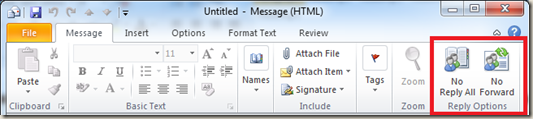
If you are an Outlook user and looking for a feature to disable reply all option the NoReplyAll plugin from Microsoft Research is for the rescue. It is a small plugin, when installed add two new buttons No Reply All and No Forward to the new message UI as shown below
image

The buttons are self explanatory and use them whenever required for your email.

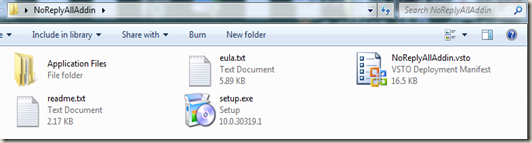
Download NoReplyAll Outlook Add-In From here which is just 300 KB in size. It is a zip file and when extracted will have 4 files including setup.exe and 1 folder in it.
image

Double click setup.exe to start the installation
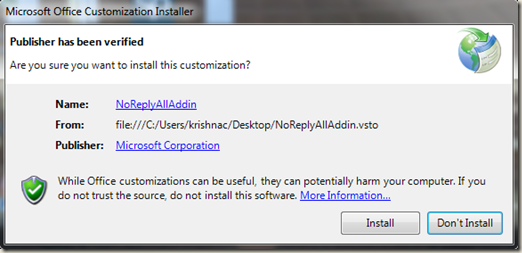
No ReplyAll-2

It would ask for confirmation to install the tool and once confirmed it would continue with the installation
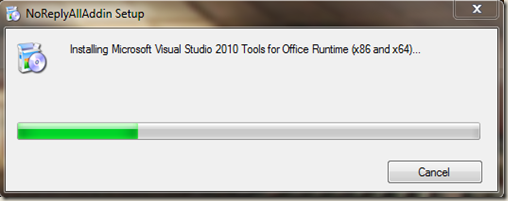
No ReplyAll-1 - Copy

When the installation is complete just click close to on the popup.
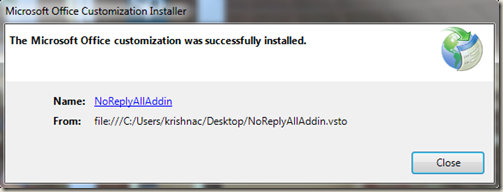
No ReplyAll-3

Now NoReplyAll Addin for your Outlook is ready for use.

Note: This plugin works only with mailing systems that use Microsoft Exchange Server as the backend and will not work for users using web based email like gmail.

In short it is a very handy tool for a Outlook 2007 and 2010 User.

Click here for more info here on the Microsoft Research site.

Thursday, June 23, 2011

How Fiber Optic Cables Work

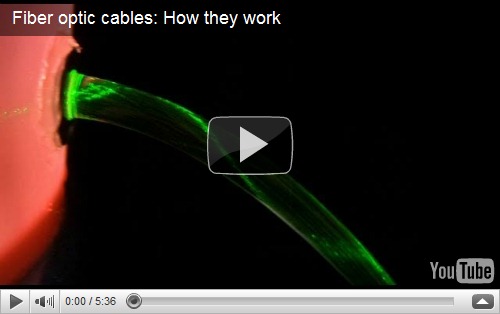
In this 5 min 30 Sec video Mr. Bill Hammack (Engineerguy) from Department of Chemical & Biomolecular Engineering, University of Illinois – Urbana shows how a fiber optic cable works using a bucket of Propylene glycol and a laser pointer.


Source: http://www.engineerguy.com/videos.htm

Click here for more about Fibre Optic Cable

Click here to know more about Propylene glycol

More on Pulse Code Modulation here

Saturday, May 14, 2011

Silent install Startup Script for Sophos Antivirus

Sophos Antivirus is one of the best enterprise grade antivirus for Windows, MAC and Linux operating environments that has features like application control, device control, NAC etc and has been one of my favourite Antivirus programs. AV agents can only be installed on the client machines from the management console of Sophos or manually using a Sophos ID and password. By default there is no automated way to install the agent when a machine is added in an Active Directory Environment.

Below code helps to create a batch file for example InstallSophos.bat using a text editor and can be added to a Startup script GPO to install Sophos Antivirus on newly added machines in a domain.

This batch file first checks if Sophos is already installed on a machine for both 32 bit and 64
bit Windows operating systems and installs the AV Agent in the background if not found.

Add Sophos server FQDN or IP address, User ID and respective password inplace of SophosServerNameHere, Domain\UserNameHere and PasswordHere in the below script.

We can even remove all the lines which start with REM as they are just comments which would make this a 5 line script :)


Sunday, February 06, 2011

Get System Serial and Model from Command Line

Many times for some or the other reason we may need to look for serial number and model of the system. We generally do that turning our laptops upside down or by looking on CPU cabinet panels.

Well there’s a much easier way to look for them using command line. If you are running Windows just issue below commands in the command prompt.

      • For Serial Number
                •      wmic bios get serialnumber
      • For Manufacturer
      •      wmic csproduct get vendor

For Model
      •      wmic csproduct get name

image

The above commands make use of Windows Management Instrumentation (WMI)

If you use Linux, a tool called dmidecode comes to the rescue. Just issue below command in terminal with elevated privilege and you would get the necessary details

dmidecode –t system

Use sudo dmidecode –t system on Debian based Linux distros like Ubuntu

image

Use su dmidecode –t system on RPM based Linux distros like Fedora

image

dmidecode is available on most of the new distros by default. If it is not available on your system you can install it from the repository or get it from here to compile and install.

Sunday, January 16, 2011

7 Billion by End of 2011

This is a video released by National Geographic Magazine with interesting facts about population on our Planet. According to them you and I will be one in 7 Billion by the end of 2011 living on EARTH